
 Newsletter: join thousands of other people
Once a month we'll send you an email with news, research and thoughts, as well as training courses and free webinars you may wish to attend.
Our websites:


Posted by Craig McConnell on the 26th November, 2026
Video games offer a great opportunity for fun, creativity and shared experiences, but accessing them isn't always straightforward for everyone. With the right equipment and adjustments, however, there are often more ways to play than you might think.
As part of our ASN Family Play Consultation service I have been investigating and experimenting with different access methods to allow a wider variety of players to truly join in. The access method described for this game is far from the only solution, and I believe most, if not all players could play this game with the right equipment and set up. Similarly, the access method used here could be applied to a wide variety of different games and the following example merely scratches the surface of what is possible in Accessible Gaming.
Asphalt Legends is a street racing game that contains a wide variety of different settings that allow users with different access methods to play and succeed in. It features a setting called “TouchDrive” that when selected the game will control the acceleration and the majority of the steering of the car. Rather than control the car through all the twists and turns of the track, users pick between 2 to 3 routes by pressing left or right. Different routes contain different power-up options such as Nitro boosts and jumps. TouchDrive can be a useful way to reduce the physical demands of multiple button inputs, but it can also be used to reduce the cognitive load of the game too.
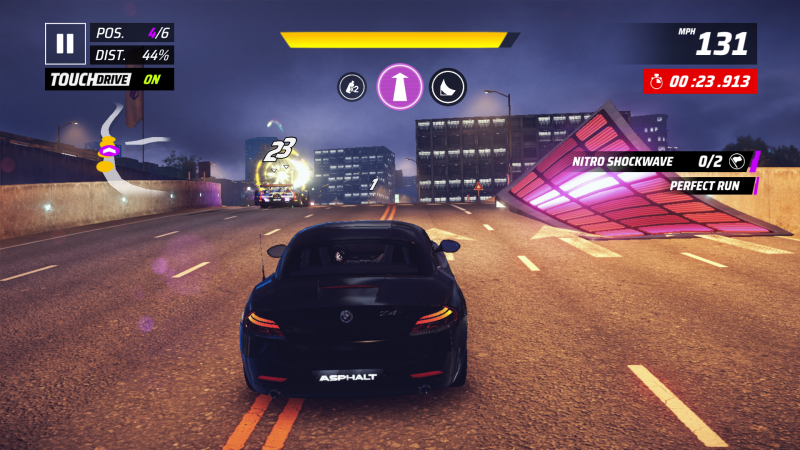
Asphalt Legends is available across all platforms (PlayStation, Xbox, Switch, PC and even for mobile on iOS and Android) and it is completely free to download and play, although parents should be wary of microtransactions within the game. The fact it doesn’t cost anything to try makes it a great option for exploring accessibility in video games as all players' needs are so nuanced, it can be very difficult assessing if a game will suit the play style and access method before purchase.
Although this game is playable through all platforms for this example, I am focusing on running it on a laptop, through Steam. Steam, for the uninitiated, is a free program that provides access to a game library on computers/laptops. Setting up an account for Steam is also free.
Rather than using a controller, keyboard, mouse or any physical input in fact, I used software that can track head, eye and facial gestures. Each individual gesture can then be mapped to an input for (in this case) the controller but could also be used to control keyboards and a mouse. The program I used is called Playability; it is free to download and gives users one free profile to use, with payment only coming if you want to add more profiles. Playability uses the built-in webcam for a laptop or an external webcam for a desktop to track your movements and gestures. There are a huge variety of movements and gestures you can map to different inputs and it will even respond to your voice if you set up key words or phrases to use.
With TouchDrive activated, there is only really 4 inputs needed to race, Left, Right, Nitro and drift. For simplicity’s sake I made left and right correspond to a head tilt in that direction. To protect against accidental triggers (and to test Playability’s accuracy) I made the Nitro and Drift buttons two very different gestures. When the car has enough boost charge stored a simple raise of both eyebrows would activate the Nitro. While turning a corner puckering my lips would cause the car to drift, holding it for as long as my lips held their position. Initially I found Playability to be quite responsive and picked up most of my movements and gestures effectively. I felt I wanted the left and right buttons to react slightly quicker, so I changed the thresholds of the input so it would not take as big a movement to activate the button.
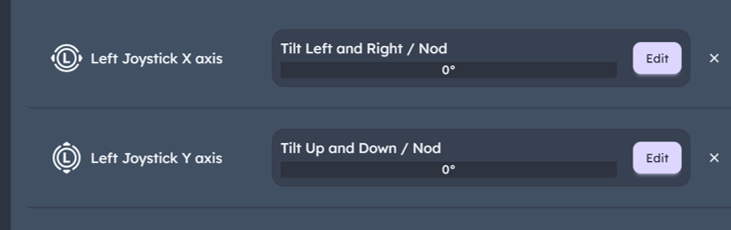
The ability to adapt the thresholds could prove crucial when setting up a profile for players with complex physical disabilities. Many may struggle to make movements big enough to trigger the action at the default setting; conversely there will be those whose movements are much more difficult to control and they may accidentally trigger an action with unintentional movement. For those cases increasing the threshold may be more beneficial.
I added some more gestures to control moving through the menus, such as a head tilt forward and back to move up and down respectively. I also added a sideways smile as a back button which enabled me to go in and out of different menus, including being able to modify my cars without ever using my hands.
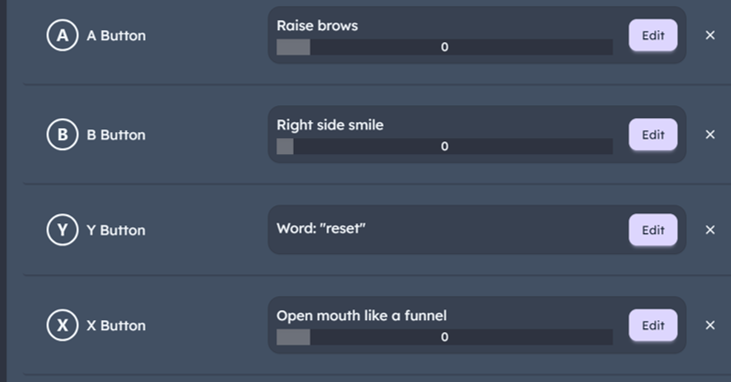
Within Playability there are also options to change how the inputs will act. The default action acts the same way as a button press on a conventional controller would. If a user was playing this game without TouchDrive turned on they would need to press and hold a button/key to accelerate and keep the car moving. Holding a gesture for the entirety of a race could be uncomfortable and extremely difficult for anyone, not just those with an additional support need, but Playability can be configured to overcome this. Gestures can be used once to latch an action, meaning it will act as a hold until the gesture is used again. Similarly, the gesture can be set to input repeated taps of the button which may be useful for shooter games etc.
Accessibility to gaming is becoming more and more diverse and this blog has barely scratched the surface of what is possible. If you want to learn more about how you can get access or assist someone with accessing games then please get in touch via our Family Play Consultation Service. Each consultation is completely free and personalised to the user, with the option to borrow equipment to try on a 2-month loan.
Newsletter: join thousands of other peopleOnce a month we'll send you an email with news, research and thoughts, as well as training courses and free webinars you may wish to attend.
Our social media sites - YouTube, Twitter and Facebook